Ecommerce UX That Converts: The Ultimate 2026 Guide
Ecommerce in 2026 is no longer about simply having an online store. Customers today have endless options, shorter attention spans, and very little patience for friction. If an ecommerce website feels confusing, slow, or difficult to use, customers leave—often within seconds.
This is why ecommerce UX design has become one of the most important growth levers for online businesses.
Great products and aggressive marketing may bring traffic, but user experience determines whether that traffic converts. Brands that invest in UX consistently outperform those that focus only on discounts or ads.
What Ecommerce UX Really Means (Beyond Design)
Ecommerce UX is often confused with visual design. In reality, UX goes much deeper.
Ecommerce UX refers to how easily users can:
- Find products
- Understand information
- Navigate the website
- Complete a purchase
- Feel confident and satisfied
Good UX feels invisible. Users don’t think about it—they just move forward naturally. Poor UX creates friction, hesitation, and abandonment.
UX vs UI: A Simple Distinction
To avoid confusion, it’s important to separate UX from UI.
- UI (User Interface) is how a website looks—colors, fonts, buttons.
- UX (User Experience) is how a website works—flow, clarity, ease, and confidence.
A website can look beautiful but still convert poorly if UX is weak.
Read Also : Your Traffic Means Nothing Without Conversions
How Ecommerce UX Impacts Conversion Rates Directly
UX is not a design trend—it is a conversion strategy.
Strong UX directly supports ecommerce conversion rate optimization by:
- Reducing confusion and friction
- Helping users make decisions faster
- Building trust at critical moments
- Making checkout feel effortless
Even small UX improvements—such as clearer buttons or simpler navigation—can lead to measurable increases in conversion rate.
Why Poor UX Is Costly in 2026
In 2026, poor UX costs more than ever because:
- Paid traffic is expensive
- Competition is intense
- Switching costs for users are low
When users leave due to bad UX, brands lose not only a sale—but also the money spent to acquire that visitor.
This makes UX optimization one of the highest-ROI investments for ecommerce brands.
Core Principles of High-Converting Ecommerce UX
Before diving into individual pages, it’s important to understand the foundational principles that define great ecommerce usability.
1. Clarity Over Creativity
Users should always know:
- Where they are
- What to do next
- What will happen after they click
Creative layouts that confuse users hurt conversions.
2. Reduce Cognitive Load
Every decision a user has to make slows them down. Fewer choices, clearer messaging, and guided flows lead to better outcomes.
3. Consistency Builds Trust
Buttons, layouts, and navigation should behave the same way across the website. Consistency reduces hesitation and builds confidence.
4. Speed Is Part of UX
A slow website feels broken. Page speed directly affects bounce rate, engagement, and conversion.
Read Also : Increase Your Ecommerce Conversion Rate by 30%
Why Ecommerce UX Matters More on Mobile
Mobile traffic dominates ecommerce, but mobile conversion rates are often lower. The biggest reason is poor mobile ecommerce UX.
Mobile users:
- Have less patience
- Use smaller screens
- Expect fast, simple interactions
If UX is not designed mobile-first, conversion losses are inevitable.
UX as a Competitive Advantage
In crowded markets, UX becomes differentiation.
When products and prices are similar, customers choose the brand that feels easier, faster, and more trustworthy to buy from.
This is why ecommerce UX is no longer a “design task”—it’s a business strategy.
Ecommerce Website Design: Creating the Right First Impression
Your ecommerce website design sets expectations within seconds. Before users read product descriptions or compare prices, they subconsciously decide whether your website feels trustworthy and easy to use.
High-performing ecommerce website design focuses on clarity, not decoration.
What High-Converting Ecommerce Websites Get Right
- Clear value proposition above the fold
- Simple, predictable navigation
- Visual hierarchy that guides attention
- Consistent branding across pages
- Fast loading across devices
When users immediately understand what you sell and how to explore it, they are far more likely to continue browsing.
Read Also : Automate Your Online Store for Faster Growth
Navigation UX: Helping Users Find Products Faster
Navigation is one of the most overlooked elements of e-commerce UX, yet it plays a critical role in conversion.
Poor navigation increases frustration and leads to exits—even when users want the product.
E-commerce Usability Best Practices for Navigation
Strong e-commerce usability starts with intuitive navigation:
- Logical category structure
- Descriptive category names
- Visible search functionality
- Filters that are easy to use on both desktop and mobile
Users should never feel lost or forced to think too hard about where to click next.
Product Page UX: Where Decisions Are Made
Product pages are the most important decision-making points in e-commerce UX design.
A strong product page answers all customer questions clearly and confidently.
Key Elements of High-Converting Product Pages
- Clear product titles and benefits
- High-quality images and videos
- Transparent pricing and delivery details
- Visible reviews and ratings
- Prominent and reassuring call-to-action buttons
Product pages should reduce doubt, not create it. When users feel informed and confident, conversions follow naturally.
Ecommerce Usability: Removing Friction Across the Journey
Ecommerce usability is about making the buying journey feel effortless.
Common usability issues that hurt conversions include:
- Hidden buttons or links
- Poor contrast and readability
- Confusing error messages
- Inconsistent layouts across pages
Improving usability doesn’t require dramatic redesigns. Small changes—like clearer labels or better spacing—often have a significant impact.
Mobile Ecommerce UX: Designing for How Users Actually Shop
Mobile ecommerce UX deserves special attention because mobile users behave differently than desktop users.
Mobile Ecommerce Behavior (India + Global)
Across India and global markets, mobile users:
- Browse quickly
- Prefer minimal typing
- Abandon easily if pages are slow
- Expect smooth payment experiences
A desktop-first design that is simply resized for mobile will struggle to convert.
Mobile Ecommerce UX Best Practices
Effective mobile ecommerce ux includes:
- Thumb-friendly buttons and inputs
- Minimal scrolling where possible
- Autofill and saved address support
- Lightweight pages with fast load times
Mobile UX should feel intentional—not compromised.
Checkout UX Best Practices: Where Revenue Is Won or Lost
Checkout is the most sensitive part of the ecommerce journey. Even motivated users will abandon carts if checkout feels difficult.
Actionable Checkout UX Best Practices
Following checkout ux best practices helps remove friction at the final step:
- Offer Guest Checkout :Forcing account creation increases drop-offs.
- Minimize Form Fields: Ask only for essential information.
- Show Progress Clearly: Users should always know how close they are to completion.
- Be Transparent About Costs : Unexpected charges are a major cause of abandonment.
- Optimize for Mobile Payments: Support popular payment methods and fast confirmation
Checkout UX should feel fast, secure, and reassuring.
How UX Supports Ecommerce Conversion Rate Optimization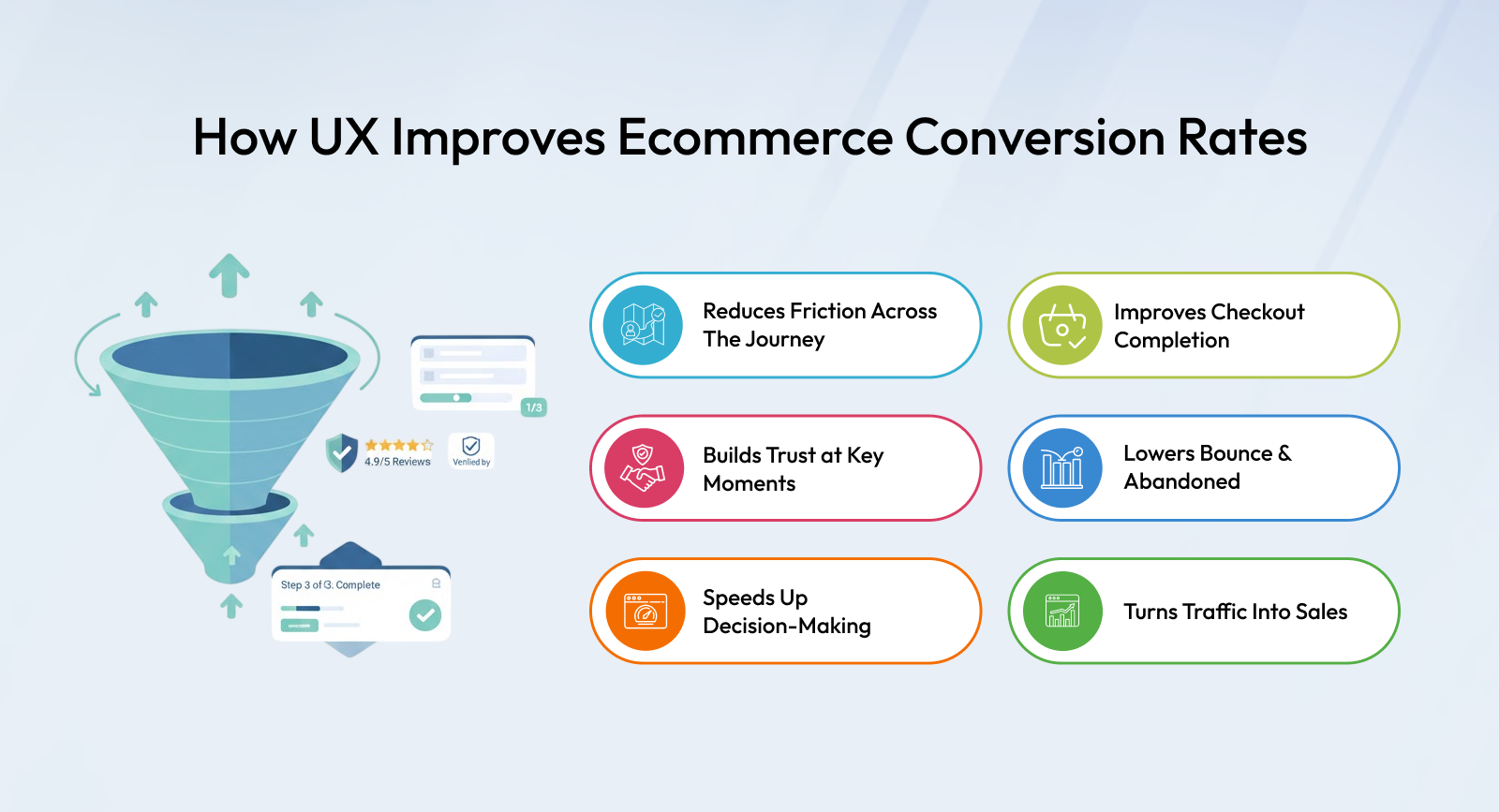
UX is the foundation of ecommerce conversion rate optimization. Traffic acquisition brings users in, but UX determines how many complete a purchase.
Strong UX:
- Reduces friction
- Builds trust
- Speeds up decision-making
- Improves checkout completion
This is why CRO efforts fail when UX fundamentals are ignored.
Why Ecommerce UX Optimization Is an Ongoing Process
One of the biggest mistakes ecommerce brands make is treating UX as a one-time project. In reality, user behavior, devices, expectations, and technology evolve constantly. What worked a year ago may already feel outdated today.
In 2026, ecommerce UX must be viewed as a continuous optimization process, not a static design decision.
Brands that regularly review and improve UX consistently outperform those that rely on assumptions or outdated designs.
Read Also : How AI Is Powering Smarter Ecommerce Growth
UX Testing: Turning Assumptions into Data
Good UX decisions are driven by evidence, not opinions.
Effective UX testing helps brands understand:
- Where users hesitate
- Which elements cause confusion
- What prevents checkout completion
- How mobile users behave differently
Common UX Testing Methods Used by High-Performing Brands
- Heatmaps to understand clicks, scroll depth, and attention
- Session recordings to observe real user behavior
- A/B testing to compare layouts, buttons, and flows
- Funnel analysis to identify drop-off points
Even small insights from testing can lead to meaningful improvements in ecommerce conversion rate optimization.
How UX Improvements Compound Over Time
One of the most powerful aspects of UX optimization is compounding impact.
For example:
- A clearer navigation structure improves product discovery
- Better product pages increase add-to-cart rates
- Optimized checkout UX increases purchase completion
- Improved post-purchase experience boosts repeat orders
Each improvement strengthens the next stage of the funnel. Over time, these gains add up to significant revenue growth—without increasing traffic spend.
UX Trends Shaping Ecommerce in 2026
As ecommerce matures, UX trends are shifting toward simplicity, performance, and adaptability.
1. Simplified, Distraction-Free Experiences
Brands are removing unnecessary elements to keep users focused on core actions like browsing and checkout.
2. Performance-First UX
Speed is no longer just technical—it’s experiential. Faster websites feel more trustworthy and easier to use.
3. Adaptive UX Journeys
Modern UX adapts based on device type, user behavior, and customer history instead of forcing a single experience on everyone.
4. Mobile-First, Not Mobile-Adjusted
Successful brands design UX for mobile first, then scale it up for desktop—not the other way around.
The Role of Platform in Ecommerce UX Success
Even the best UX strategy can fail if the underlying platform is rigid or slow. To implement and iterate UX improvements effectively, brands need platforms that offer flexibility, performance, and control.
A scalable ecommerce platform like Shopaccino enables businesses to optimize ecommerce UX without compromising speed, security, or stability—allowing teams to focus on improving user experience rather than managing technical limitations.
(Brand mentioned once, contextually, as requested.)
Final Verdict: What Makes Ecommerce UX Convert in 2026
So, what truly makes ecommerce UX convert in 2026?
The answer is not a single design trend or feature.
High-converting ecommerce UX is built on clarity, usability, speed, and continuous improvement.
Brands that prioritize:
- Clear ecommerce website design
- Strong ecommerce usability
- Thoughtful mobile ecommerce UX
- Proven checkout UX best practices
consistently see better results than those chasing cosmetic changes.
UX is no longer just about how a website looks—it’s about how confidently and effortlessly customers can buy.
FAQs
Ecommerce UX refers to how easily and comfortably users can browse products, understand information, and complete purchases on an online store.
Well-designed UX reduces friction, builds trust, and guides users smoothly through the buying journey, directly improving conversion rates.
Good usability makes shopping effortless, encouraging customers to return and buy again rather than switch to competitors.
With most shoppers using smartphones, poor mobile UX leads to high bounce rates and abandoned carts, making mobile optimization essential.
Navigation clarity, page speed, product presentation, and checkout simplicity have the biggest influence on user experience
Simplified forms, guest checkout, clear progress indicators, and transparent pricing help users complete purchases without frustration
Yes. Better UX encourages product discovery, cross-selling, and confident decision-making, which can increase average order value.
UX should be reviewed regularly, especially after traffic changes, design updates, or shifts in customer behavior
Common mistakes include cluttered layouts, slow load times, confusing navigation, and forcing account creation at checkout.
Marketing drives traffic, but UX converts that traffic into revenue. Without strong UX, even high-quality traffic will not convert.