
How Local Grocery Stores Can Go Online and Compete with Big Delivery Apps
Local grocery stores have always been the heart of neighborhoods—familiar faces, trusted quality, and dependable service. But in the last few years, big delivery apps have changed how people buy groceries. Customers now expect instant ordering, live tracking, flexible delivery, digital payments, and real-time availability.
For small and mid-sized grocery stores, the challenge isn’t competition—it’s adaptation.
Most stores still rely on traditional operational methods: manual billing, WhatsApp orders, phone calls, handwritten lists, and delayed stock updates. These methods work on a small scale, but they collapse when order volume increases or when customers expect digital convenience.
The good news?
Local grocery stores can now build their own online grocery store, create their own grocery delivery app, and compete with large platforms—without massive investment or coding.
That’s where Shopaccino steps in.
With Shopaccino, grocery businesses get a unified eCommerce system that supports inventory management, delivery slots, subscription plans, wallet payments, order tracking, and location-based delivery—everything big delivery apps offer, but with more control and more profit.
How can a local grocery store sell online and compete with big delivery apps?
A local grocery store can compete with big delivery apps by launching its own branded online store and delivery app that offers the same convenience — live stock, delivery-slot selection, digital payments, order tracking, and repeat-order subscriptions — while keeping full margins and direct customer relationships. The practical path is: set up an online catalogue with real-time inventory, define delivery zones and time slots, enable UPI and cash-on-delivery, and automate order routing and reminders. Unlike national apps that charge heavy commissions, a store on its own platform keeps 100% of each sale and owns its customer data.
Challenges Local Grocery Stores Face When Going Online
Going online sounds exciting, but the shift reveals several operational challenges that grocery owners have struggled with for years. These challenges slow down growth, reduce profit margins, and break customer trust.
A. Managing Orders from Multiple Channels
Local stores often receive orders via phone, WhatsApp, text messages, or walk-ins. This leads to:
- Scattered order records
- Confusion in delivery sequence
- Mixed-up billing
- Lack of order visibility
The absence of a central system makes it difficult to track who ordered what, what needs to be delivered first, and what items are unavailable.
B. Inconsistent Stock Updates
Grocery stock changes fast—milk, vegetables, bread, packaged goods, and FMCG items sell out quickly.
Without real-time inventory updates:
- Customers place orders for items that aren't available
- Refund conversations and frustrations increase
- Staff wastes time checking availability manually
- Stores lose repeat customers due to bad experience
C. Delivery & Route Planning Confusion
Delivery agents decide routes themselves, often leading to:
- Longer travel times
- Missed deliveries
- Unnecessary fuel cost
- Poor delivery sequence
When a store manages dozens of orders manually, route errors multiply.
D. Manual Billing & Payment Handling
Cash transactions create friction:
- Delays in payment collection
- Missing entries
- Reconciliation issues
- Customers demanding digital receipts
Customers now prefer UPI, wallets, and seamless checkout.
E. No Subscription or Repeat Order Mechanism
Grocery stores rely heavily on recurring purchases:
- Milk
- Bread
- Eggs
- Vegetables
- Staples
But without a subscription system, stores must depend on customers' daily reminders.
This is where big delivery apps win—they automate recurring orders.
Challenges Customers Face When Buying from Local Grocery Stores
Customers also struggle when local stores are not digitally equipped.
A. Unclear Stock Availability
Customers often call to ask:
- "Is bread available?"
- "Is milk in stock?"
- "Do you have fresh vegetables today?"
Uncertainty forces customers to switch to digital apps.
B. No Order Tracking
People now expect to know:
- Where their order is
- When the delivery agent will arrive
- Whether an item is out of stock
Traditional methods offer no visibility.
C. Lack of Digital Payment Options
Customers today rarely want to handle cash.
When a store does not offer:
- UPI
- Wallet
- Card payments
They prefer platforms that do.
D. No Delivery Slot Selection
Customers want flexibility:
- Morning delivery
- Evening delivery
- Same-day delivery
Most local stores either delay deliveries or deliver without a planned schedule.
E. No Convenience Features
Big platforms offer:
- Saved addresses
- Reorder in one click
- Suggestions
- Offers
- Notifications
Local stores rarely provide these, causing customers to drift away.
How Do Grocery Delivery Apps Work with Multiple Local Stores?
Grocery delivery apps work like an online marketplace. The app lists products from multiple local stores in one place, takes the customer's order and payment, and sends the order to the nearest store. The store packs the items, and a delivery partner (or the store's own rider) brings them to the customer in the chosen time slot.
How an order moves on a grocery delivery app
- The customer enters their location, and the app shows only the stores that deliver to that area.
- The customer adds products, picks a delivery slot and pays online or chooses cash on delivery.
- The app sends the order to the store, which checks stock and packs the items.
- A delivery partner picks up the order, and the customer tracks it live.
- The app keeps a commission on every order.
Grocery Delivery Platforms for Multiple Store Types
Many grocery delivery platforms work with multiple stores and store types at the same time: supermarkets, kirana shops, fruit and vegetable sellers, bakeries and dairy outlets. The customer sees one combined catalog, but each order is still packed by one store near them.
Do Grocery Delivery Apps Work with Local Independent Grocery Stores?
Yes. Most grocery delivery apps accept independent stores as sellers. But the store has to follow the app's rules, pay a commission on each order and sit next to nearby competitors on the same screen.
Grocery Delivery Apps vs Your Store's Own Website
A grocery delivery app is a shared marketplace where your shop is one of many sellers. Your store's own website and app show only your products, under your brand, at your prices.
- Commission: Delivery apps take a cut of every order. On your website, you keep the full order value.
- Customer data: The app owns the customer. With your website, you keep customer details and order history.
- Pricing: Apps often push discounts. On your website, you set the price.
- Competition: On an app, your shop sits next to competitors. On your website, customers see only your store.
- Repeat orders: On your website, you can run subscriptions, wallet payments and offers for regular buyers.
For most local stores, the smart move is simple: use apps for discovery if they work for you, but move regular customers to your own website and app, where every order earns more.
Which Grocery Delivery App Is Best for Large Weekly Shops?
For a large weekly shop, the best grocery delivery app is one that has a full catalog with reliable stock, lets you book a delivery slot in advance, has no cap on items per order, saves past orders as a list, and accepts UPI, wallet or cash on delivery. Very often, a trusted local store's own app ticks all these boxes, because it carries the shop's full range and delivers big orders from nearby.
What to look for when you shop weekly
- Full grocery catalog: staples, fresh produce, dairy, household and personal care in one order.
- Scheduled delivery: book the same slot every week.
- One-tap reorder: repeat last week's order and change only what you need.
- Out-of-stock alerts: get a message if an item is not available, so you can pick a replacement.
- Clear delivery fee: free or flat delivery above a set order value.
How to Pay for a Weekly Grocery Order Without a Card
You don't need a credit or debit card. Most local grocery stores that sell online accept UPI, net banking, prepaid wallets and cash on delivery. With Shopaccino, a store can also offer an in-app wallet: customers top it up once, and the weekly order is paid from the wallet without a card.
How to List a Large Grocery Catalog on a Delivery App or Your Own Store
Use bulk upload. Prepare one spreadsheet with product name, category, brand, price, pack size, stock and image link, and upload it in one go. Shopaccino lets you upload products in bulk. Group items into clear categories like staples, fruits and vegetables, dairy, snacks and household, and add filters for brand and pack size so shoppers can find items fast in a large grocery catalog.
Solution — How Shopaccino Helps Grocery Stores Go Online Successfully
Shopaccino enables grocery stores to operate like full-scale digital businesses - with complete control, zero commissions, and a branded web + mobile ordering system that works across devices.
Here’s how Shopaccino solves every major challenge:
Unified Online Store + Mobile App
Grocery stores get their own:
- Branded website
- Branded mobile app
- Customer login
- Order tracking
- Push notifications
Customers view live stock, place orders, and choose delivery options seamlessly.
Real-Time Inventory Management
Shopaccino updates stock automatically when:
- A customer buys an item
- Store updates stock quantities
- Items go out of stock
Features include:
- Dynamic stock sync
- In-stock / out-of-stock updates
- Multiple warehouse/ store support
- Expiry-based inventory handling
Delivery Time Slots and Delivery Zones Management
To manage delivery time slots and zones for online grocery orders, first decide where you deliver, then decide when.
- Delivery zones: Set delivery zones by pincode, radius or locality, and give each zone its own delivery fee and minimum order value.
- Delivery time slots: Create flexible delivery slots such as morning, evening, 2-hour windows and same-day slots.
- Orders per slot: Keep a fixed number of orders per slot based on how many riders you have, so no slot gets overloaded.
- Cut-off time: Close same-day slots a few hours before delivery so your team has time to pack.
- Delivery instructions: Let customers add a note at checkout, like “call before arriving” or “leave at the gate”.
Customers pick a slot for their zone at checkout. They get flexible delivery slots, and you get a planned delivery schedule
Route Planning & Delivery Optimization
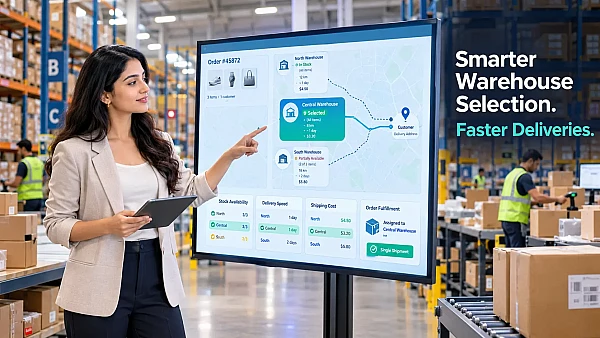
Shopaccino groups all orders by location and assigns them a sequence.
Delivery agents get a mapped route, reducing:
- Travel time
- Fuel usage
- Delivery errors
In-App Wallet for Subscriptions
Perfect for daily or repeat purchase categories like:
- Milk
- Curd
- Bread
essentials
Customers recharge their wallet → system auto deducts → zero payment follow-ups.
SMS, WhatsApp, and Push Notifications
Stores can automatically notify customers about:
- Order updates
- Delivery reminders
- Payment alerts
- Offers
- Wallet balance
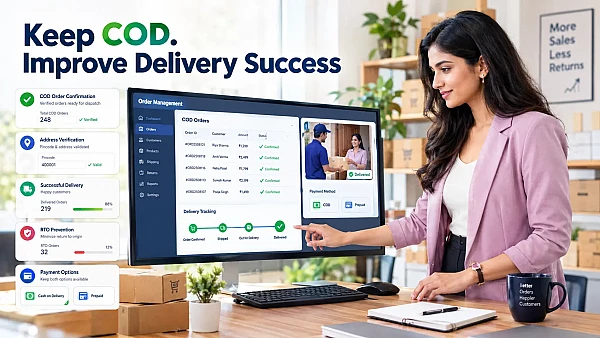
Online Payments + COD
Customers get multiple payment modes:
- UPI
- Net banking
- Wallet
- Cards
- COD (if enabled)
Cart Recovery & Automation
If a customer abandons their cart, Shopaccino automatically sends reminders using:
- SMS
This increases conversion rates significantly.
What Is Hyperlocal Grocery Delivery and How Can Your Store Offer It?
Hyperlocal grocery delivery means delivering groceries from a nearby store to customers within a small area, usually a few kilometres, often on the same day or within a few hours. Local grocery stores are already built for this: the shop is close to its customers, knows what they buy and can deliver fresh items fast.
How to start hyperlocal grocery delivery from your store
- Set a delivery radius, for example 3 km, or a list of pincodes.
- Create short delivery slots, like 1 or 2 hours, for nearby orders.
- Plan routes so one rider covers several nearby orders in one trip.
- Show live stock so customers only order what you have.
- Keep a minimum order value so each trip is profitable.
Shopaccino supports radius and pincode-based delivery zones, time slots and route planning, so a local store can run its own hyperlocal grocery delivery on its own grocery delivery platform without depending on aggregator apps.
How to Start an Online Grocery Store and Delivery Business (Step-by-Step)
Here is a simple step-by-step process to start your own online grocery store and online grocery delivery business using Shopaccino:
Step 1: Create Your Grocery Store Account
Sign up and choose a design theme that suits your grocery brand.
Step 2: Add Your Products
Upload items in bulk:
- Groceries
- Vegetables
- Fruits
- FMCG
- Daily essentials
Add pricing, images, stock, variants, and packaging details.
Step 3: Set Up Delivery Areas & Slots
Define delivery zones:
- By pincode
- By radius
- By locality
And configure time-slot-based delivery.
Step 4: Enable Payment Methods
Choose:
- UPI
- Online payment gateways
- Wallet-based payment
- COD
Step 5: Offer Store Pickup (Order Online, Pick Up In-Store)
Not every customer wants delivery. Add store pickup as a checkout option: the customer orders online, picks a pickup time and collects the packed bag from your counter. Store pickup saves delivery cost, works well in small towns and on busy evenings, and brings customers into your shop, where they often buy more.
Step 6: Launch Your Mobile App
Shopaccino builds your app with:
- Your brand name
- Your logo
- Your theme
Step 7: Promote Locally
Use:
- WhatsApp marketing
- Flyers with QR codes
- Social media ads
- Local promotions
Step 8: Automate Operations
Enable:
- Stock sync
- SMS alerts
- Cart recovery
- Subscription plans
- Route planning
This reduces manual workload drastically.
Benefits of Taking Your Local Grocery Store Online
Going online with Shopaccino gives grocery stores several powerful advantages:
Compete with Big Apps with Zero Commission
Unlike delivery apps charging heavy commissions, Shopaccino lets you keep 100% profit.
Build Long-Term Customer Loyalty
Through features like:
- Saved preferences
- Subscription models
- Digital payments
- Personalized notifications
Control Over Pricing & Margins
Set your prices—no forced discounts.
Faster Order Processing
Automated order routing improves efficiency.
Real-Time Tracking & Transparency
Both store owners and customers get complete visibility.
Scalable for Future Growth
Expand:
- Service areas
- Stock levels
- Delivery staff
- Product catalog
without changing platforms.
Conclusion
Local grocery stores have always had one major advantage—trust. What they lacked was technology. With big delivery apps expanding aggressively, local stores need to modernize to retain their loyal customer base.
Shopaccino's grocery app development platform gives grocery businesses the power of a full-fledged online grocery store + delivery app, but without complexity, huge investment, or commissions.
If you want to compete with big delivery apps, grow your customer base, and operate more efficiently, this is the right moment to go online.
Your grocery store deserves growth.
Your customers deserve convenience.
Shopaccino brings them together.
FAQs
No. Shopaccino is a no-code platform. You pick a ready-made grocery theme, add your products and set delivery options from a simple dashboard.
Yes. Your grocery website and mobile app run from one dashboard, so products, stock, orders and payments stay in sync on both.
Yes. You can create flexible delivery slots such as morning, evening and 2-hour windows, and customers pick their preferred slot at checkout.
Yes. Customers can set daily or weekly subscriptions for items like milk, bread and eggs, paid automatically from their in-app wallet.
Yes. Orders are grouped by location and assigned to delivery agents with a planned route, so each rider covers more orders in less time.
Yes. It is designed for stores of any size, from a small kirana shop to a large supermarket.
No. A smartphone and a basic laptop are enough to run your online grocery store.
A grocery delivery app lists many stores and charges a commission on each order. Your own website shows only your store, with your brand and prices, charges zero commission and lets you keep your customer data.
Yes. Set a delivery radius or pincodes around your store, add short delivery slots and use route planning to deliver nearby orders on the same day.
Yes. Customers can pay by UPI, net banking, wallet or cash on delivery (if enabled), so no credit or debit card is needed.
Yes. You set your own delivery zones, so you can cover nearby small towns and villages by pincode or radius.