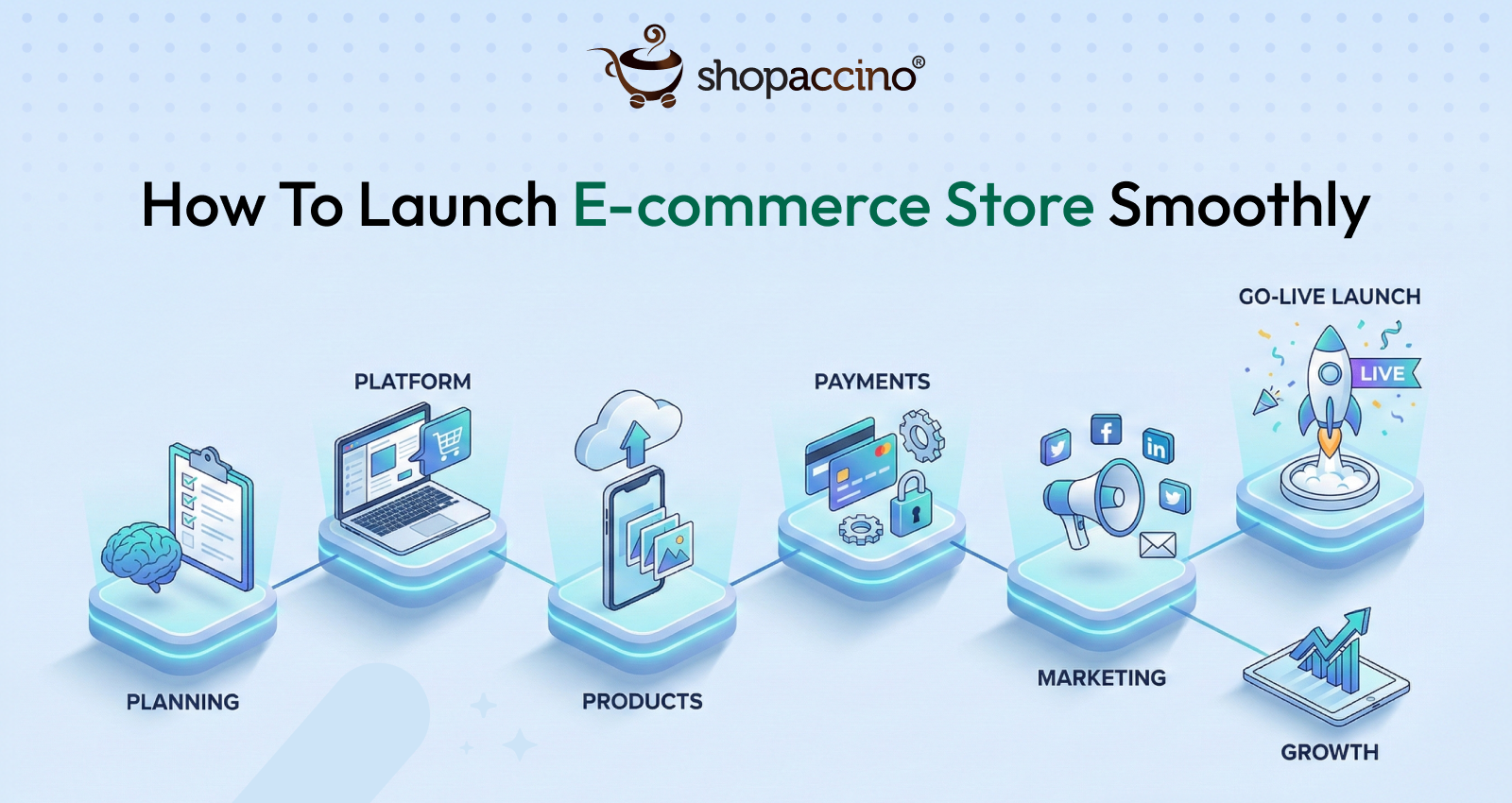
How To Launch E-commerce Store Smoothly
Are you planning to launch your E-Commerce store? Great!!! But before launching, did you checklist all the essential points which make your launch day flawless.
No?
Don’t Worry, Let's get ready to cover all the essential points.
The ultimate beginner’s guide to setup an e-commerce store
Here we are providing very simple and user-friendly guidelines to setup your remove own online store. It will help you to build a perfect and beautiful e-commerce store.
To set up an e-commerce store you need to decide what product you need to sell, and where it is to be sold and many other points are to be taken care of which are described as below:
Domain Registration:
Domain Name Registration: Protect your domain name first by registering domain name with your brand / company name like www.yourdomainname.com. You should keep your domain name simple & easy so that your customers can easily remember it.
Categorize your products
Product Categorization:Product categorization is the way to filter out your products according to the category for your website users to find their desired products on your ecommerce store. While deciding the categories make sure, user will not get confused when they are browsing your store.
If you have any question in your mind - How to do a categorization?Then answer in a simple way is, just to see what others similar industries as yours are doing on their website. For example if you are dealing in Men’s and Women’s clothing, then your categories will be 1) Men’s 2) Women’s.
Implement Remote Monitoring Software to Boost Workflow:
Using remote monitoring tools is also important for the smooth operation of an e-commerce store, especially when managing distributed teams. These tools enable real-time oversight of workflows and team productivity, which is essential for improving employee performance management and productivity monitoring, ensuring that all aspects of the business—from customer service to order fulfillment—are running efficiently. By proactively identifying bottlenecks or issues, remote monitoring tools help maintain seamless operations, reducing downtime and enhancing the overall customer experience.
Do product photo shoot and describe your product.
Product Photo shoot:Photo shoot of the products is very important & it’s an impressive way to convert your visitors into buyers. You should take 3 to 4 shoots of each product from front, side, top and rear view for better visualization of the product. You can also hire a professional photographer to capture the realistic and perfect photos of the product. While doing individual product photo shoot also makes sure you click some photos for your website banners, where you are displaying the range of the products. Getting your photos right is one of the 6 essential requirements to start an ecommerce store, so it's worth the extra effort.
Product Description and Content Writing: You need to describe your products properly, so that the user can understand details about your product. On e-commerce store, there are no salesmen and hence you need to describe your product information properly, such as Product title, product description, features, specifications, colors, size chart (if any) etc.
Pricing of your product: Decide your Product Prices, Discounts, Taxes, and Shipping & Handling Fees. It’s very important to get customer attention and for that your price needs to be competitive as well as profitable for you. When you sell online, you can offer an affordable price to your customer because your expenses are less compared to offline store. But don’t put your product price with very low margin, keep little bit of margin so that if required you can run seasonal offers, like: 20% discount on New Year. Such offers will help you to attract the customers and boost your sales.
Apart of your product range, what else you will require to setup your e-commerce store?
Brand Logo:If you already have a logo for your brand, use the same. If you don’t have any logo for your brand, get it designed by some professional logo designers. Or you can simply use your brand name as logo with some stylish font until your brand logo is not ready.
Describe your business:It’s very important to explain your business in “About Us” page, as most of the visitors would like to know about your business before buying any product from your store.
Terms & Policies:Define terms and policies very clearly to build user confidence and maintain transparency for your customers. If required, you can read your competitors website terms and policies. But, do not just copy and paste because every business have different terms, so spend some time to make your terms and policies as it is one time activity. If you feel any difficulties you can take help of some professional lawyers for writing terms for your online store.
Payment Gateway: Payment gateway creates a bridge between your website and your customer bank / bank cards. So that you can accept payment through Internet Banking, Master / Visa cards. There are many payment gateway service providers; you can select according to your requirement. Few are listed below: For a detailed comparison of fees and settlement times, check out our guide to the best payment gateways in India.

Shipping Partner: You need a shipping partner to ship your products and get it delivered to your customer once you have received an order online. You can get shipping rates with doing tie-up with shipping agencies. It will help you to decide your shipping rates for your online store. hipping is just one piece of the puzzle — see our complete guide to setting up an ecommerce store for the rest.
Now its time to setup your online store, so let’s do it.
To create your beautiful and perfect online store, you can use E-commerce platform “Shopaccino” because it is user-friendly, comes with 30 days free trial, quick setup.
You need to register yourself on Shopaccino by filling a simple form. You can upload your store in very less time and with very little investment.
Upload categories: Categories list, which you already have. Upload the same for your online store.
Upload products: Now its time to start uploading your product into categories with all detailed description.
Upload brand logo and other content: Upload your brand logo, about us and terms & policies for your store.
Wow! You are ready for launch
- Do a test run and launch your store from temporary URL to your own domain.
End of the line
We have covered all the essential points to setup an e-commerce store. Now, its time to launch the store and start selling!Hope, our users will find it as a useful guide which is required by any new user to set up any kind of online store. Above these are few essential initiative steps to establish a new online store, but it is not enough to generate sales in any e-commerce business. You need to start a promotion to stand in this competitive market. There are various promotion activities which exist in internet marketing to expand your online business worldwide.
We will provide you some tips & guidelines in our next write-up to run an online business after set up a store simultaneously to generate sales.Keep reading continuously our blog to find a new stuff every time.