
How to Manage Inventory Across Multiple Warehouses on Your B2B Ecommerce Store
Quick Answer: To manage inventory across multiple warehouses, you need one central stock record that every sales channel reads from, warehouse-level visibility for every SKU, and rules that decide which location fulfills each order. A B2B inventory management software does all three automatically, syncing stock in real time so a wholesale order in one country never oversells inventory sitting in another.
Most B2B businesses do not choose to run multiple warehouses. They grow into it. A manufacturer adds a depot closer to its biggest distributor cluster. An exporter starts holding duty-paid stock inside a key market to cut delivery times. A wholesaler leases overflow space when the main facility fills up. Each decision is sound on its own, and each one quietly breaks an inventory process that was designed around a single location.
The break shows up in predictable ways: stock counts that disagree between locations, wholesale orders accepted against inventory that was already committed elsewhere, transfers that vanish from the books while in transit, and shipping costs that climb because orders route to the wrong warehouse. None of these are people problems. They are structural problems, and they have a structural fix. This guide covers that fix in full: how multi-warehouse inventory actually works, the setup sequence that prevents the common failures, and where a B2B inventory management software handles automatically what no spreadsheet was built to track.
What Is Multi-Warehouse Inventory Management in B2B Ecommerce?

Multi-warehouse inventory managementis the practice of tracking, allocating, and fulfilling stock across two or more storage locations from a single system of record. Instead of each warehouse keeping its own count, every SKU has one master quantity, broken down by location, and every order placed on your store draws from that shared truth.
For a B2B business, this carries more weight than it does in retail. A consumer order that oversells one unit is an apology email. A wholesale order that oversells 500 units is a broken commitment to a distributor who has their own customers waiting, and those relationships do not absorb many mistakes before the buyer starts sourcing elsewhere.
The businesses that need this most are exactly the ones most likely to be running it on spreadsheets: manufacturers holding stock at the factory and a regional depot, exporters with bonded and domestic warehouses, distributors serving different territories from different hubs, and D2C brands that added a wholesale channel without adding a system to match.
Why Does Inventory Break Down Once You Add a Second Warehouse?
One warehouse hides a lot of sins. A slightly stale stock count usually gets caught when someone walks the aisle. The moment a second location enters the picture, four specific failure points open up, and they compound each other.
Stock counts stop agreeing with each other
Each location updates its own record on its own schedule. Warehouse A counts on Mondays, warehouse B counts when things are quiet. By Thursday, the total your sales team quotes to a buyer is a blend of two numbers taken days apart, and neither reflects the pallet that shipped this morning.
Orders get routed by guesswork
Without rules, someone decides by memory which warehouse ships each order. That works until the person who knows is on leave, or until an order splits across locations and half of it ships from the wrong coast, doubling the freight cost on a deal that was priced on thin wholesale margins.
Transfers between warehouses become invisible stock
Stock in transit between your own locations is the easiest inventory to lose track of. It has left one count and not yet joined the other. For days, it exists nowhere on paper, and any system that cannot represent in-transit stock will either double-count it or drop it entirely.
Every channel sees a different number
Your B2B portal, your retail storefront, and your sales reps each pull stock from wherever is convenient. The result is two buyers sold the same pallet, each holding a confirmation your business cannot honor. This is the exact gap that real-time stock synchronization exists to close: one update, visible everywhere, the second it happens.
How Do You Set Up Multi-Warehouse Inventory Management the Right Way?

The setup below works whether you are moving from one warehouse to two, or untangling five locations that grew organically. Go in order. Most multi-warehouse messes come from skipping step one and jumping straight to software settings.
Step 1: Build one master SKU list before anything else
Every location must use identical SKU codes. If the factory calls it MRB-SLAB-60 and the export depot calls it SLAB60-MARBLE, no system on earth can reconcile
them. Standardize codes, units of measure, and pack sizes first. A carton in one warehouse must mean the same quantity as a carton in the other.
Step 2: Do a physical count at every location on the same day
Your new system is only as good as its opening balance. Counting warehouses weeks apart bakes the drift into your baseline. One coordinated count, even a rough cycle count of your top-moving SKUs, gives every location the same starting line.
Step 3: Centralize the stock record
Move every location onto one inventory tracking system where each SKU shows a total quantity and a per-warehouse breakdown. This is the single most important structural change. From this point, no warehouse maintains a private count that the rest of the business cannot see.
Step 5: Set warehouse-level reorder points
A global reorder point across all warehouses is nearly useless. Two hundred units total means nothing if all two hundred sit in the wrong region. Set minimum levels per SKU per location, based on the demand that location actually serves, and let low stock in one warehouse trigger either a purchase order or an internal transfer from another.
Step 6: Write down your order routing rules
Decide, explicitly, how the system picks a fulfilling warehouse: nearest to the buyer, cheapest to ship from, most stock on hand, or a priority order you define. There is no universally correct rule, but there must be a rule, applied the same way every time, rather than a judgment call made under deadline.
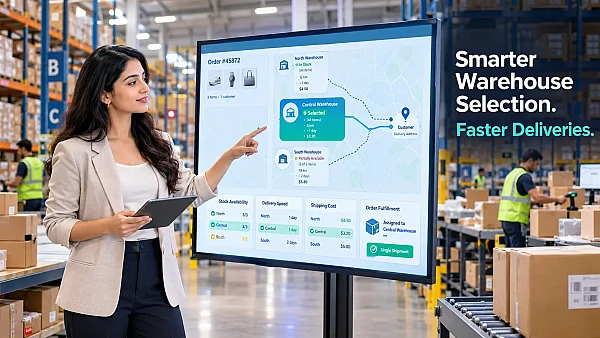
Which Warehouse Should Fulfill Each Order?
Routing sounds like a technical detail, but it quietly decides your shipping cost, delivery speed, and how evenly stock depletes. Good warehouse order routing usually balances three pulls against each other.
- Proximity: shipping from the warehouse nearest the buyer cuts freight cost and transit time, which matters doubly on bulk B2B orders where freight is a real line item, not a flat fee.
- Stock depth: routing everything to the nearest warehouse can drain a small regional depot in a week while the main facility sits full. Sometimes the right call is shipping from farther away to protect local stock for local urgent orders.
- Order integrity: splitting one wholesale order across two warehouses means two shipments, two tracking numbers, and a confused receiving dock on the buyer's side. Many B2B sellers prefer routing to whichever single location can fulfill the entire order, even at slightly higher freight.
For international sellers, one more layer sits on top: customs. An exporter serving both EU and Gulf buyers may hold duty-paid stock in a European warehouse and export stock at origin. Routing then follows the paperwork, not just the map, which is exactly why routing rules belong in software rather than in someone's head.
What Metrics Tell You Your Multi-Warehouse Setup Is Working?
You do not need a dashboard with forty widgets. Five numbers, checked monthly, tell you nearly everything.
- Stock accuracy rate: how closely system counts match physical cycle counts, per warehouse. Anything under 95 percent means your process is leaking somewhere.
- Oversell incidents: orders accepted against stock that did not exist. The target is zero, and with real-time sync it is an achievable zero, not an aspirational one.
- Fulfillment cost per order by warehouse: rising cost from one location often means routing rules are sending it orders it should not be handling.
- Inter-warehouse transfer frequency: constant emergency transfers mean your initial stock placement does not match where demand actually lives.
- Days of cover per location: how long each warehouse can serve its own demand at the current run rate. This is the number that turns rebalancing from a panic into a schedule.
What Mistakes Should You Avoid When Managing Multiple Warehouses?

Treating the second warehouse as an overflow closet. If location B is just where extra pallets go, with no owner, no counts, and no reorder points, its stock will quietly rot off the books. Every location needs the same discipline as the first, scaled to its size.
Showing buyers a total that includes unsellable stock. Damaged goods, samples, and stock reserved against contracts must sit outside the available number. A B2B buyer who orders against phantom availability once will pad every future order with a backup supplier.
Syncing on a schedule instead of in real time. A nightly sync sounds close enough until you realize B2B order sizes make every gap expensive. Eight hours of drift on a fast-moving SKU is exactly how two large buyers get sold the same pallet.
Running B2B and D2C stock in separate systems. Manufacturers and distributors selling wholesale and direct from the same inventory need one count feeding both channels, with channel-level allocation on top. Two systems reconciled by hand is just the two-warehouse problem wearing a different hat.
How Does B2B Inventory Management Software Handle All of This Automatically?
Everything above can technically be done manually. The honest question is for how long. Past a certain order volume, the coordination cost of spreadsheets grows faster than the business does, and this is the point where a B2B inventory management software stops being a nice-to-have and becomes the operating layer the business runs on.
A proper system gives you one stock record with per-warehouse visibility, updates every channel the moment an order lands, applies your routing rules without anyone thinking about them, tracks transfers in transit, and keeps reserved wholesale stock invisible to channels that should not touch it. The failure points from earlier in this article are not managed better. They are removed.
This is the problem Shopaccino was built around. As a global commerce platform designed for exporters, manufacturers, distributors, and D2C brands, it ships with multi-warehouse order fulfilment and integrated inventory as core features rather than plugins: one stock record across every location, real-time sync across your B2B portal, storefront, and mobile app, and location-aware fulfilment for both bulk wholesale orders and single retail purchases from the same backend.
For businesses selling across borders, the same system layers on multi-currency pricing, international payments, region-based pricing, and international shipping, so the warehouse serving your Gulf distributors and the one serving your European retailers operate under one roof. And because Shopaccino charges zero transaction fees on the platform, the margin you protect by not overselling stays yours.
The practical difference shows up in small moments. A bulk order placed against stock that another buyer already committed gets caught in milliseconds, not discovered at dispatch. The system offers the units genuinely available, or a realistic lead time, at the moment of ordering. No apology call afterward. No distributor quietly opening an account with your competitor.
When Is the Right Time to Make This Switch?
There is a tempting answer, which is when things break, and a better answer, which is just before they do. Three signals reliably show up in the months before a multi-warehouse mess turns expensive.
The first is when reconciliation becomes a standing task. If someone on your team spends part of every week making warehouse counts agree with each other, that labor is the system telling you it no longer fits. The second is your first serious oversell on a wholesale order. One incident is survivable, but it is rarely random. It means the drift is now larger than your safety buffer, and the next incident is a matter of order volume, not luck. The third is expansion itself. Opening a new warehouse, entering a new export market, or adding a D2C channel to a wholesale business all multiply the coordination load overnight, and moving onto proper software before the expansion is far cheaper than migrating in the middle of the chaos it creates.
The switch itself is less painful than most owners expect, provided steps one and two from earlier are done first. Clean SKUs and a same-day opening count do most of the heavy lifting. The software then has accurate numbers to keep accurate, which is all any system can promise.
Key Takeaways
- One master stock record with per-warehouse breakdowns beats perfect discipline across separate counts. Structure solves what memory cannot.
- Standardize SKUs and count all locations on the same day before touching any software settings.
- Allocation rules decide what each channel is allowed to sell. Routing rules decide which warehouse ships it. Both must be explicit, not tribal knowledge.
- Real-time synchronization is non-negotiable in B2B, where a single oversell can cost a distributor relationship, not just one sale.
- A B2B inventory management software like Shopaccino removes the manual relay entirely, syncing stock, channels, and warehouses from one platform with zero transaction fees.
FAQs
It is a system that tracks stock across all your warehouses and sales channels from one record, syncing quantities in real time so wholesale orders, retail sales, and transfers all draw from the same accurate count.
Briefly, at low volume, with discipline. But spreadsheets cannot sync in real time, represent in-transit stock cleanly, or enforce routing rules, so error risk grows with every added location and order.
Through rules you define: nearest warehouse, lowest shipping cost, deepest stock, or a set priority order. Good systems apply the rule automatically and can prefer a single location that fulfils the whole order.
Yes, and it works best that way. One stock record feeds both channels.
Yes. Platforms like Shopaccino combine multi-warehouse fulfilment with multi-currency, region-based pricing, and international shipping, so stock in different countries serves the right buyers under one system.